Recurring Bookings
You can finally say goodbye to re-entering the same booking over and over. Just create a booking once, select how often it repeats and how long for, and Shlott will automatically add it to your calendar every time. Simple as that!
Key benefits of recurring bookings:
- Save time with faster booking
- Reduce manual work
- Make managing your calendar more efficient
Who can use recurring bookings?
- This feature is reserved for our pro subscription users
- Like the sound of it? Subscribe to Shlott Pro!
How does recurring bookings work?
You have the option to create expiry dates for categories (objects) and members (eg licence expiries).
Step 1:
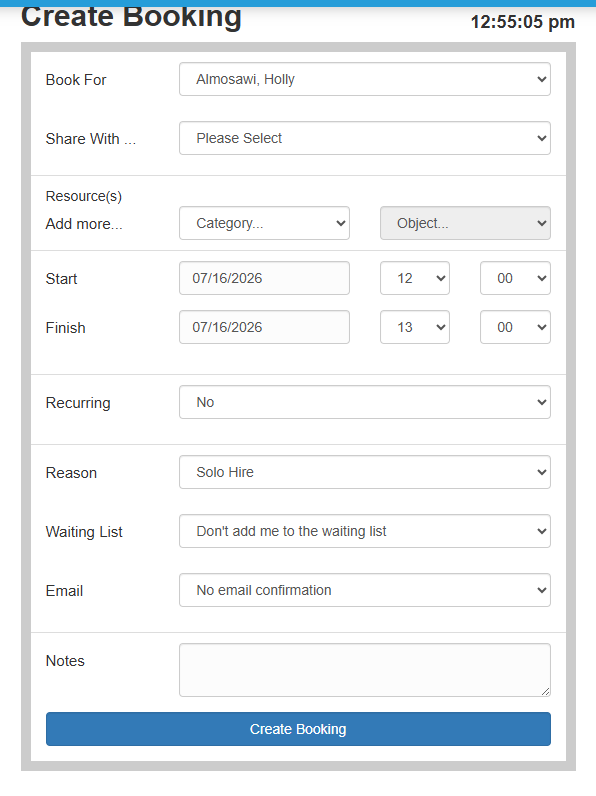
- Go to your 'Day', 'Week' or 'Month' view of the calendar and scroll down to the 'create booking' option:
Step 2:
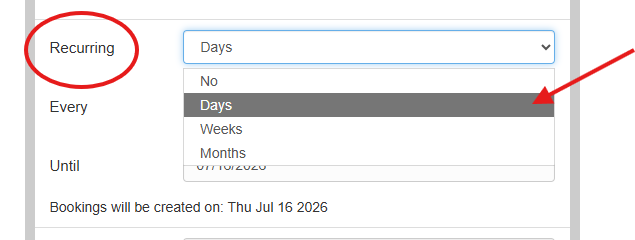
- Select the 'recurring' option and choose from the drop-down how often you would like the event to occur:
Step 3:
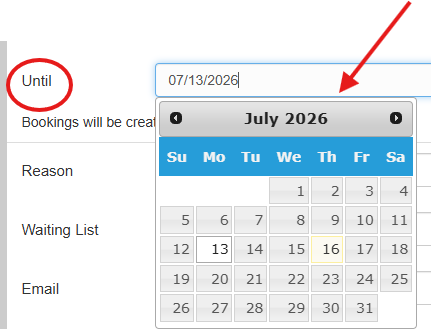
- Then select how long you would like the recurring booking:
And that's it, continue with the rest of your booking as normal and it will create multiple bookings for you.
Helpful resources:
Find more useful information on Shlott here: